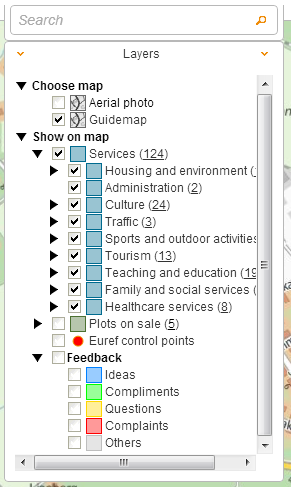
Map layers and data sets that are shown in the map window are chosen from menu tree on the left side of the browser window.
The map used in the service can be changed by clicking the map name on the list or by selecting the check box leading the name. Several maps can be viewed on top of each other by selecting the check box for each of them.
Object classes are opened by clicking the class name or the he check box leading the class name.
The objects in the object class are viewed on map by selecting the check box leading the class name. Several materials can be viewed at the same time by selecting the check box for each of them.
Removing the selection of the check box hides the objects on the map.
The object name can be viewed by rolling the mouse cursor over the object symbol on map.
Information about the object can be viewed by clicking the object symbol on map. If there are several objects on top each other, a drop-down menu is shown for choosing the desired object.